


Deepsearch AI Search Assistant
4.37.33K Reviews
App Specs
- Version
- 1.3.9
- Updated On
- License
- Free
- Downloads
- 10,000,000+
- Developer
- TapSuite
- Categories
- Lifestyle
- Platform
- Android, iOS
Screenshots




 Analysis by AppCompare
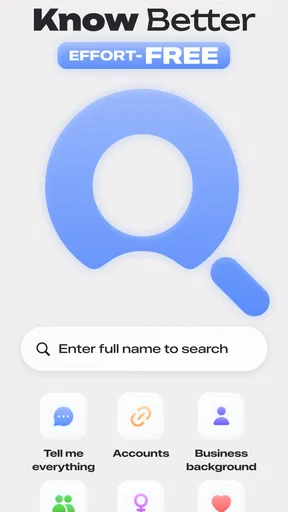
When I need a quick lead on a person or a topic, I want search to help me narrow the field rather than hand me another wall of links. That is the idea behind Deepsearch AI Search Assistant, a free lifestyle app from xStudios built around finding publicly available information with AI. Its focus gives it a different feel from a conventional web browser, but it also calls for a more careful approach: a polished result is still something to check, especially when it concerns a real person.
What the app is trying to do
The current release is version 1.2.4, and the app has been available since April 16, 2025. It has reached over 5 million installs, with an average rating of 3.7 from around 232,000 ratings and roughly 4,400 written reviews. Those figures suggest a widely tried tool with mixed reactions, rather than a search assistant that every user will find equally useful. It is free to install, with in-app purchases ranging from $6.99 to $39.99 per item, so I would explore the basic experience before deciding whether any paid option suits your needs.
The key distinction is the subject of the search. A general search engine is usually the better choice for opening websites, checking a broad topic, or locating an official source. This app is aimed more at searching and connecting publicly available information about people. That can be useful for legitimate, everyday research, but it does not turn scattered or incomplete public material into a definitive biography. I would treat it as a starting point, not as proof.
Making searches more useful
When a query is vague, I find it helps to add a useful point of distinction rather than piling on guesses. A profession, a public project, or a place associated with a public role can make a search more focused. I would avoid entering sensitive personal details or assumptions: extra words do not automatically make a result more reliable, and searches about people deserve restraint.
A practical way to use the app is to keep track of what you are actually trying to establish. If you are checking whether a speaker has worked on a particular public project, for example, search that connection, then compare any promising result with the project’s own public page or another direct source. This two-step habit helps separate a useful lead from a confident-sounding match that may refer to someone else with a similar name.
Where it fits in a daily routine
I can see the appeal when I have a specific question but do not know which public source might answer it. Before a community event, I might want to learn about a guest’s publicly documented work; while researching a topic, I might want to find people associated with a public initiative. In those situations, a people-focused search can be a convenient first pass. For a current event, a factual claim, or anything important to a decision, I would still check an original publication or an official source rather than rely on a search summary alone.
That distinction matters for students and professionals, too. It may help surface names and possible connections during preliminary research, but it is not a substitute for citations, careful source checking, or a specialist database when accuracy and traceability matter. If your main goal is ordinary web browsing, local business directions, or a direct answer from an official service, the usual search engine is likely the simpler tool.
Worth Reading Before You Choose

Flipboard Shows What News Apps Must Do Beyond the Feed

Switching to Android Auto Means Rethinking Your Driving Routine

Google Calendar Makes a Crowded Week Easier to Manage

Ludo King Makes the Most of the Minutes Between Plans

Baby Panda World Brings Quick Play to Modern Phones, but Its Game Library Feels Busy

ESPN’s Live Game View Makes Following Close Games Easier
Privacy and sensible boundaries
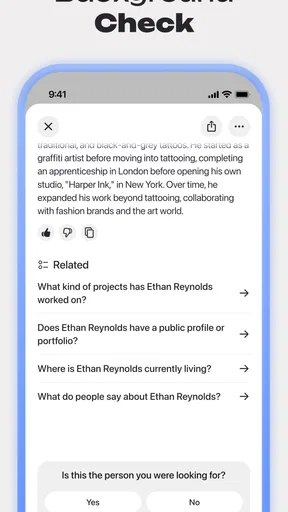
Because the app is centered on public information about people, I would use it with a clear boundary: search for material that is already public and relevant to a legitimate purpose, not to uncover private details or build a dossier. Public visibility does not make every use respectful. I would also avoid treating a name match as confirmation of identity, especially when the person is not widely known or the query lacks context.
One useful habit is to separate discovery from verification. Save or note the source behind a lead, then check whether it is current and whether it actually concerns the same person. If you cannot establish that connection, do not repeat the claim as fact. This takes a little longer than accepting the first plausible result, but it is a worthwhile trade-off for a tool whose subject is people rather than products or general reference questions.
Who should try it, and who may prefer something else
I would recommend giving it a try if you regularly do preliminary research involving public figures, public work, or connections that are difficult to find through a single obvious search. It may also suit curious users who are comfortable checking results independently and understand that an AI-assisted discovery tool is not an authority. The Teen content rating is another reason to approach searches thoughtfully, particularly if younger users share a device or account.
I would skip it if you want guaranteed background checks, comprehensive records, or verified identity matching. It is also not the right fit for anyone who would rather avoid people-search tools on privacy grounds. In those cases, use an official directory, a direct organization website, or a conventional search engine for the specific public page you need. Those alternatives may be less convenient for exploring connections, but they make the source and purpose of the information easier to see.
Getting Started
Jumping into Deepsearch AI Search Assistant is a breeze. The app is available on both Android and iOS, so whether you're Team Android or Team iPhone, you're covered. The download was quick, and within minutes, I was ready to dive into its features. The user interface is sleek and straightforward, which made me feel right at home. No fumbling around trying to figure out where things are—always a plus.
Features That Stand Out
So, what sets Deepsearch AI apart from the countless other search tools out there? First off, its advanced AI algorithms make it incredibly efficient in parsing through information. Imagine having a personal assistant that not only understands your queries but also predicts them. It's like having a mind reader in your pocket!
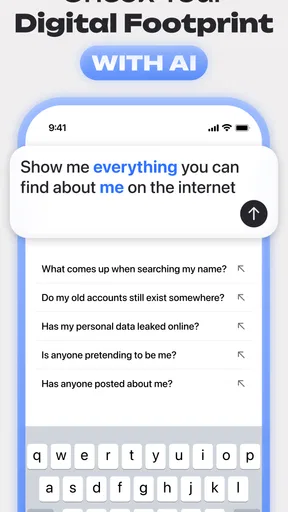
The app also boasts a feature where it suggests related queries as you type. This was a game-changer for me, especially when I wasn't exactly sure what I was looking for. The suggestions were relevant and often led me to discover information I didn’t even know I needed.
Real-World Application
I decided to test its capabilities by searching for a mix of popular and obscure topics. From trending news to niche research articles, Deepsearch AI handled them all with precision. The results were consistently accurate and presented in an easy-to-read format. I loved how it prioritizes the most relevant information first, saving me from the endless scroll we've all experienced on other search platforms.
Another feature I found particularly useful was the voice search option. On days when typing felt like a chore, I simply spoke my query, and the app responded promptly. It's super handy for multitasking or when you're on the go.
Room for Improvement
While I was impressed with many aspects of Deepsearch AI, there were a couple of areas where I felt it could improve. Occasionally, the app took a bit longer to load results for more complex queries. Also, while the design is user-friendly, a dark mode option would be a welcome addition for those late-night searches.
Those slower searches are worth bearing in mind if you are trying several detailed queries in a row: a quick, simple lookup is a better fit for an on-the-go moment than an involved research session with a deadline. I would also avoid assuming that a neat result presentation means the underlying material is complete or freshly updated. For anything time-sensitive, check the original source and its date before acting on what you find.
What to watch as it develops
The app’s current version gives users a concrete point of reference, but a version number alone does not tell me how much the search experience has changed over time. For existing users, the practical question is whether searches remain useful for their own topics and whether results are easy to verify. I would judge future changes by improvements that affect those daily tasks—clearer context around results, dependable performance on complex searches, and better ways to distinguish a likely match from a confirmed one.
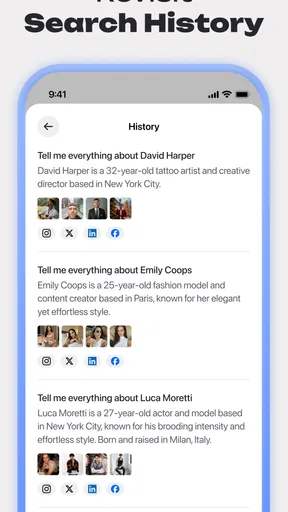
If you are deciding whether to keep using it, try a few searches whose answers you can independently check. Compare a broad query with a narrower one, follow the source behind a result, and see whether the suggested queries help you explore without steering you away from your actual question. That small test gives you a better sense of fit than relying on a single impressive-looking result or the overall rating.
Final Thoughts
In a world where information overload is a daily challenge, Deepsearch AI Search Assistant stands out as a powerful tool that can help us navigate the chaos. Its intuitive design, combined with robust AI capabilities, makes it a must-try for anyone looking to streamline their search experience.
Whether you're a student, a professional, or just someone with a curious mind, this app has something to offer. Give it a whirl and let it transform the way you search. Who knows, it might just become your new favorite app!
My recommendation comes with one important qualification: I would use it to discover leads, not to settle questions about a person without checking the sources. That makes it most valuable to curious, careful searchers who want another route into public information, and less compelling for users who need a fully documented research trail or a simple general-purpose search box. Used with that distinction in mind, it can be a handy companion; used as a final authority, it asks for more trust than I would give any search assistant.
Pros
- Fast and accurate search results
- User-friendly interface
- Supports voice commands
- Integrates with multiple apps
- Customizable search settings
Cons
- Requires constant internet connection
- Limited offline capabilities
- May consume significant battery
- Occasional ad interruptions
- Data privacy concerns
FAQs for Deepsearch AI Search Assistant
What is Deepsearch AI Search Assistant, and how does it work?
Deepsearch AI Search Assistant is an advanced application designed to enhance your search experience. Utilizing artificial intelligence, it offers personalized search results that adapt to your preferences over time. The app continually learns from your interactions to provide more accurate and relevant information, making your searches more efficient.
Is Deepsearch AI Search Assistant compatible with both Android and iOS devices?
Yes, Deepsearch AI Search Assistant is available for download on both Android and iOS platforms. Users can access it through the Google Play Store for Android devices and the Apple App Store for iOS devices, ensuring a seamless experience across different mobile operating systems.
How does Deepsearch AI ensure user privacy and data security?
Deepsearch AI Search Assistant prioritizes user privacy by implementing robust encryption protocols to protect your data. The app collects minimal information, focusing only on enhancing the search experience. Users have control over their data, with options to manage or delete their personal information at any time.
Does Deepsearch AI Search Assistant require an internet connection to function?
Yes, an active internet connection is necessary for Deepsearch AI Search Assistant to function optimally. The app relies on real-time data retrieval and processing to deliver accurate search results. However, it offers some offline capabilities, like saving previous searches for later access.
What kind of support does Deepsearch AI offer to its users?
Deepsearch AI provides comprehensive support through various channels, including in-app help sections, an online knowledge base, and a responsive customer service team. Users can find answers to common questions and troubleshoot issues quickly, ensuring a smooth user experience.


